
The Science of Image Compression: An Advanced Guide to Optimizing Web Performance
Mastering the balance between visual fidelity and technical efficiency using modern file size reducers.
Introduction: The Critical Intersection of Visual Content and Site Speed
In the modern digital landscape, images account for over 60% of the average webpage's total weight. As search engines evolve, the demand for high-resolution visual storytelling often clashes with the technical necessity for lightning-fast load times. This is where an advanced image compressor becomes an indispensable tool for developers, digital marketers, and content creators.
Google’s Core Web Vitals—specifically Largest Contentful Paint (LCP)—now dictate how your site ranks in the SERPs (Search Engine Results Pages). If your hero image is an unoptimized 5MB behemoth, your rankings will suffer. Utilizing a professional file size reducer is no longer optional; it is a fundamental requirement for SEO survival.
The Mechanics of Compression: Lossy vs. Lossless Algorithms
To truly optimize your digital assets, you must understand the mathematics behind the tools. Not all compression is created equal.
Lossy Compression: Maximum Efficiency
Lossy compression works by identifying and removing redundant data and fine details that the human eye cannot perceive. For example, in a photograph of a blue sky, there are thousands of shades of blue. Lossy algorithms group these similar pixels together. When using an online image compressor for JPGs, you can often reduce file size by up to 80% with zero visible degradation to the casual browser.
Lossless Compression: Perfect Fidelity
Lossless compression is essential for assets that require pixel-perfect clarity, such as logos, icons, or text-heavy graphics. This method reduces file size by removing metadata and using more efficient coding pathways (like Huffman coding) without discarding a single pixel. While the reduction is less dramatic (usually 5-20%), it ensures that your brand’s visual integrity remains 100% intact.
Why Your SEO Strategy Fails Without Image Optimization
You can write the best content in the world, but if your page speed is sluggish, users will bounce. Here is how an image file size reducer directly impacts your bottom line:
- Reduced Bounce Rate: Studies show that a 1-second delay in mobile load times can impact conversion rates by up to 20%.
- Improved Crawl Budget: Search engine bots have a limited "budget" for crawling your site. Smaller images allow bots to index more pages in less time.
- Enhanced Mobile UX: With mobile-first indexing, Google prioritizes sites that perform well on 4G and 5G networks. Compressed images ensure smooth scrolling and rapid rendering on handheld devices.
Strategic Implementation: GigaConverter as Your Secret Weapon
When searching for the best image compressor, efficiency and security are paramount. The GigaConverter Image Compressor is engineered to handle the heavy lifting of optimization via a browser-based interface, eliminating the need for expensive software like Photoshop.
Step-by-Step Optimization Workflow:
- Audit Your Current Assets: Use tools like PageSpeed Insights to identify "oversized" images.
- Batch Processing: Upload multiple files to our tool simultaneously. Whether it's JPG, PNG, or WebP, the engine adapts to the file type requirements.
- Select Compression Levels: Balance your specific needs. For high-end photography portfolios, opt for light compression; for blog thumbnails, go for aggressive reduction.
- Deployment: Re-upload the optimized files to your CMS (WordPress, Shopify, etc.) and watch your performance scores climb.
The Future of Web Images: WebP and Beyond
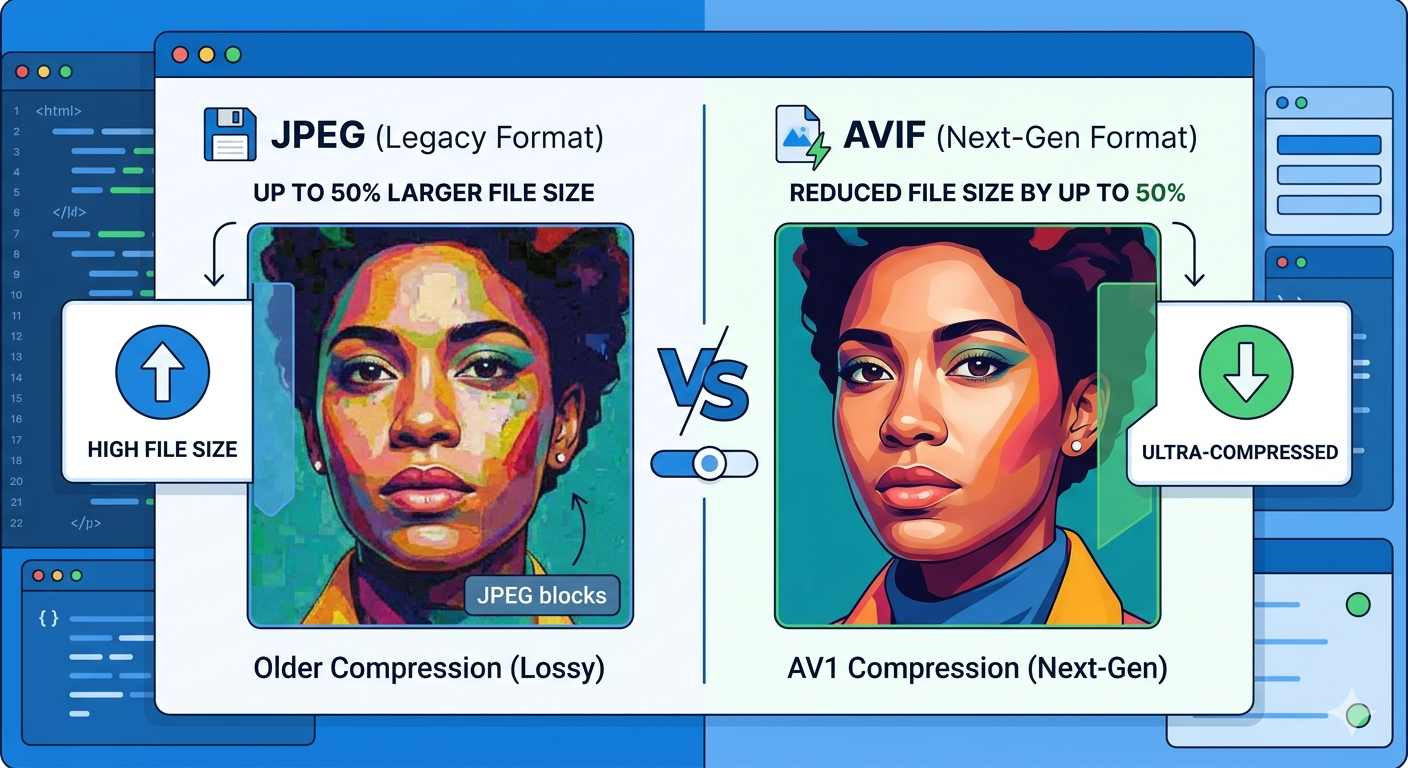
Modern web standards are shifting. While JPG and PNG have been the industry stalwarts, formats like WebP and AVIF are the new frontier. These formats provide superior compression and quality characteristics compared to their predecessors.
A high-quality online file size reducer helps you transition between these formats, ensuring your site stays modern. WebP files are typically 25-35% smaller than JPGs of the same quality, making them the preferred choice for forward-thinking SEO experts.
Common Myths About Image Compression
Myth 1: Compression always ruins quality.
Fact: Advanced AI-driven compressors can reduce file size significantly while maintaining "retina-ready" quality.
Myth 2: I don't need to compress if I have a fast server.
Fact: Server speed is only half the battle. The bottleneck is often the user’s data connection. Large images will always lag on mobile networks, regardless of your hosting provider.
Conclusion: Transform Your Site Performance Today
Image optimization is the "low-hanging fruit" of technical SEO. It requires minimal effort but yields massive results in page speed, user satisfaction, and search engine visibility. By integrating a reliable image compressor into your content workflow, you ensure that your website remains competitive, lean, and user-friendly.
Ready to boost your site speed? Experience the power of professional-grade optimization with the GigaConverter File Size Reducer. Fast, free, and designed for the modern web.

Comments (0)
Leave a Comment