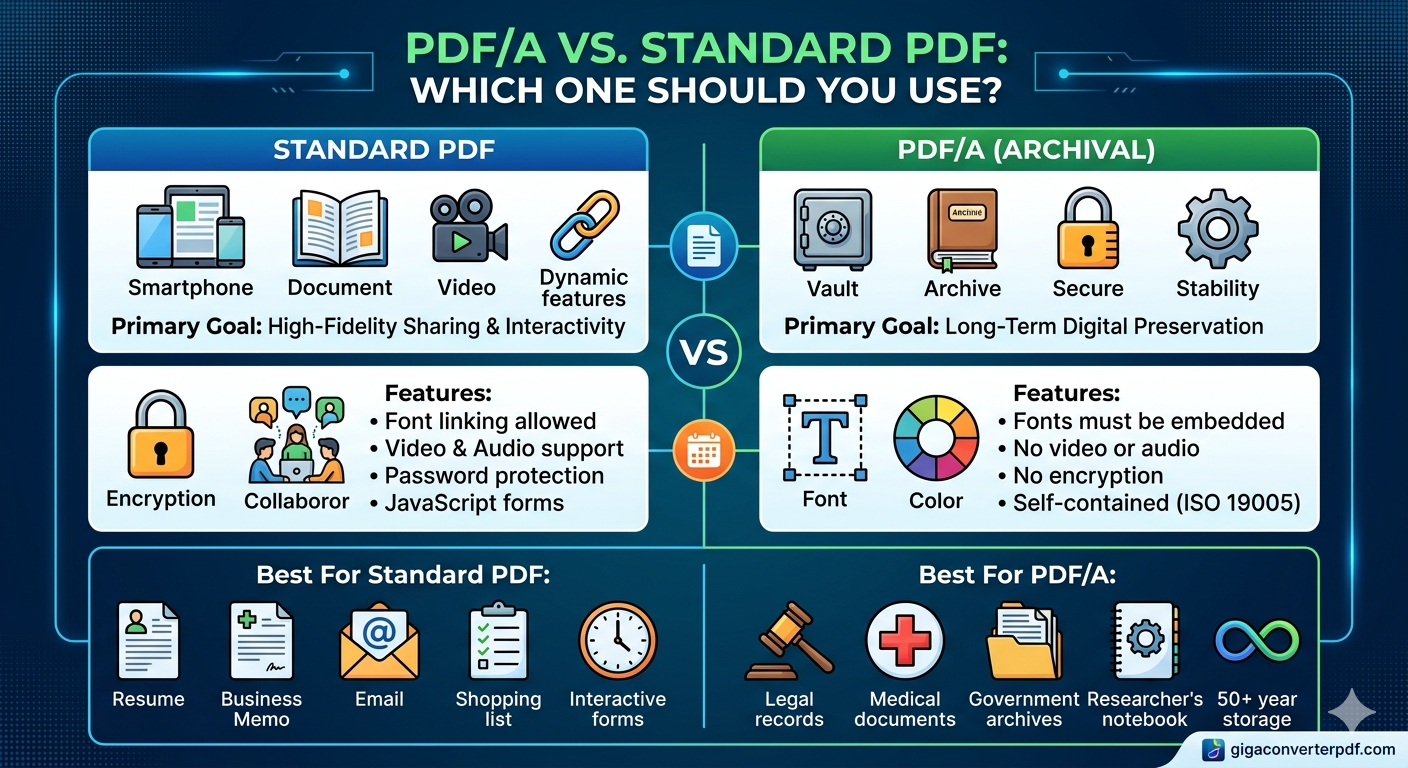
The Difference Between PDF/A and Standard PDF: Which One Should You Use?
Published on April 01, 2026 | GigaConverterPDF Team
When you save a document, you probably don't think twice about clicking "Save as PDF." However, if you are managing digital archives, legal documents, or long-term records, choosing between a Standard PDF and PDF/A is a critical decision. A mistake can lead to data loss or unreadable files decades down the road.
Below is a comprehensive guide to help you choose the right format for your specific digital preservation strategy.
What is a Standard PDF?
A Standard PDF (Portable Document Format), standardized under ISO 32000, is designed for "portable" viewing. Its primary goal is to ensure that a file looks the same on every device it is opened on today.
- Dynamic Features: Standard PDFs can include interactive elements like hyperlinks, form fields, JavaScript actions, and embedded video or audio.
- External Dependencies: They often rely on external resources, such as system fonts (the fonts installed on your computer) or external color profiles. If those fonts aren't on the viewer's computer, the document might substitute them, changing the layout.
- Best For: Everyday business use, sharing resumes, quick memos, interactive documents, and files you plan to edit or protect with a password.

What is PDF/A?
PDF/A is a specialized, ISO-standardized version (ISO 19005) of the PDF specialized for the long-term digital preservation of electronic documents. The "A" stands for Archive.
- Self-Contained: Unlike standard PDFs, a PDF/A must be 100% self-contained. This means all fonts (e.g., Arial, Times New Roman), color data, and image metadata are embedded directly into the file.
- Prohibited Elements: To ensure the file can be opened 50 or 100 years from now, PDF/A strictly forbids features that might break over time, such as JavaScript, audio/video, external links, and encryption (which requires a password that might be lost or whose algorithm might become obsolete).
- Versions: Note that there are different levels of conformance, such as PDF/A-1b (basic raster preservation) and PDF/A-2a (more modern feature support, still self-contained).
- Best For: Legal records, government archives, medical records, research data, and any document that needs to remain readable for decades.
PDF/A vs. Standard PDF: Key Differences at a Glance
This table summarizes the main technical differences crucial for file management.
| Feature | Standard PDF (ISO 32000) | PDF/A (Archival ISO 19005) |
|---|---|---|
| Primary Goal | High-fidelity sharing and interactivity today | Long-term digital preservation and stability |
| Fonts | Can be linked (external) or substituted | Must be fully embedded in the file |
| Multimedia | Supports Video & Audio | Prohibited |
| Encryption | Supports Password Protection | Prohibited |
| Interactivity | Supports JavaScript & Fillable Forms | Limited (forms allowed in later standards like PDF/A-2) |
| Dependencies | Can depend on external resources | Must be 100% self-contained |
Which One Should You Use?
Choose Standard PDF if:
- You are sending a quick attachment via email where long-term storage isn't a concern.
- You need a password-protected document for temporary security.
- You want to include rich media (video or audio) within the document.
- The document has a short lifespan (e.g., a newsletter, a flyer, or a collaborative draft).
- You require interactive elements like JavaScript calculator forms.
Choose PDF/A if:
- You are a lawyer, doctor, historian, or researcher keeping vital records for years.
- You are submitting official documents to a government agency, library, or court system.
- You want to guarantee the document will look exactly the same in 2075 as it does today, regardless of technological shifts.
- The document is "final" and requires no further interactive editing or password security.
How to Convert Your Files
If you have a standard PDF and need to make it archive-ready, you can easily convert it. While some desktop software can handle this, online tools offer a fast, cost-effective solution.
Tools like GigaConverterPDF allow you to transform standard files into the specialized PDF/A format with just a few clicks. This process embeds all necessary fonts and removes obsolete features, ensuring your critical data remains safe and accessible for the long haul.
Summary
While a Standard PDF is the king of versatility, modern features, and interactive content, **PDF/A** is the gold standard for long-term reliability and history. For most daily tasks, stick to Standard; for your legacy, choose PDF/A.
Comments (0)
Leave a Comment